
8 Best AI Image Generators for Fashion Photography in 2026
Your new collection needs product-page images, a launch campaign, and enough variations to test in paid social. You have garment photos, a few approved model shots, and a deadline that leaves little room for another shoot.
The hard part is deciding which images you can generate, which ones you should edit, and how much work each result will need before your team can use it. A model wearing a convincing jacket is only half the answer. The pockets, print, color, and closures still have to match the brief.
Ideogram suits fashion teams creating reference-guided campaigns, making precise edits, and exploring colors and materials. FASHN supports garment-to-model generation and virtual try-on. Botika focuses on apparel imagery with retouching options, while Photoroom and Claid combine fashion images with broader catalog production. Flair suits staged product campaigns, Adobe connects generation with detailed finishing, and Midjourney supports editorial exploration.
At Ideogram, we generated a fashion image and tested background, styling, color, and material changes on it. For FASHN, Botika, Photoroom, Claid, Flair, Adobe, and Midjourney, we worked from their official documentation and pricing pages.
Overview : Which AI fashion photography tool fits your job?
Start with the image you have and the deliverable you need. A text prompt, a flat lay, and an approved campaign photograph give a generator different information.
| Tool | Where it fits | Starting point |
|---|---|---|
| Ideogram | Reference-guided campaigns, precise edits, colorways and material studies | Text prompts; garment, model or scene references |
| FASHN | Virtual try-on and product-to-model imagery | Garment and model photos, depending on the feature |
| Botika | Apparel catalog imagery and retouching | Flat lay, mannequin or on-model photo |
| Photoroom | Fashion imagery within catalog automation | Clothing photos, with optional model reference |
| Claid | Fashion and product-image production | Garment photos and brand references |
| Flair | Staged fashion and accessory campaigns | Product images, props and scene direction |
| Adobe Firefly + Photoshop | Campaign exploration and detailed finishing | Prompts, references and existing creative |
| Midjourney | Editorial concepts and visual direction | Prompts, subject and style references |
For merchandise you sell, the deciding question is whether the output represents the actual product. For a concept campaign, you may have more freedom to invent the outfit, setting, and styling.
Overview : How we tested Ideogram for fashion photography
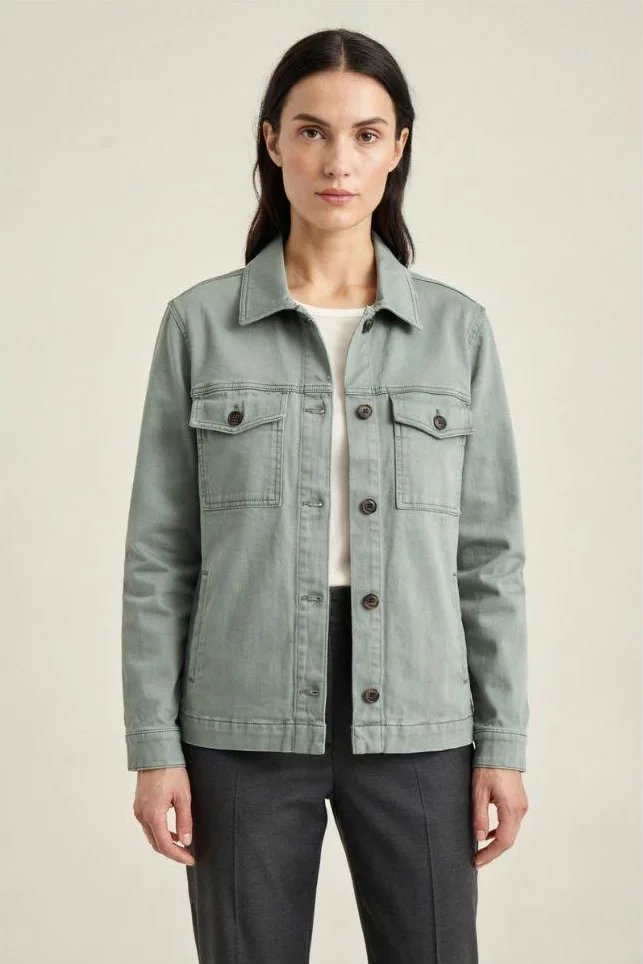
We used a sage utility jacket with visible collar points, chest pockets, buttons, and stitching. Those details gave us something specific to compare after each change.
Settings: Ideogram 4.5, High quality, for the original and two prompt-based edits. Colorways and Material Swap were separate app tests. We retained the first result from each attempt. All five saved PNGs are 1,365 × 2,048 pixels. The briefs below summarize our instructions.
Starting image: A sage utility jacket
Prompt brief: An ecommerce-style portrait of a front-facing woman in a sage utility jacket, ivory top and charcoal trousers, with a light background and clearly visible garment construction.
Result: The collar, chest flap pockets, and button row were visible, with the arms away from the jacket front. We used those details to check the later edits.
How can I change a background without changing the garment?
Use a targeted background edit and compare the garment with the source before approving the new setting.
A store owner in an ecommerce discussion about lifestyle images wanted new settings for ads but worried about altered product colors and details. Our test explored that revision with the generated jacket image.
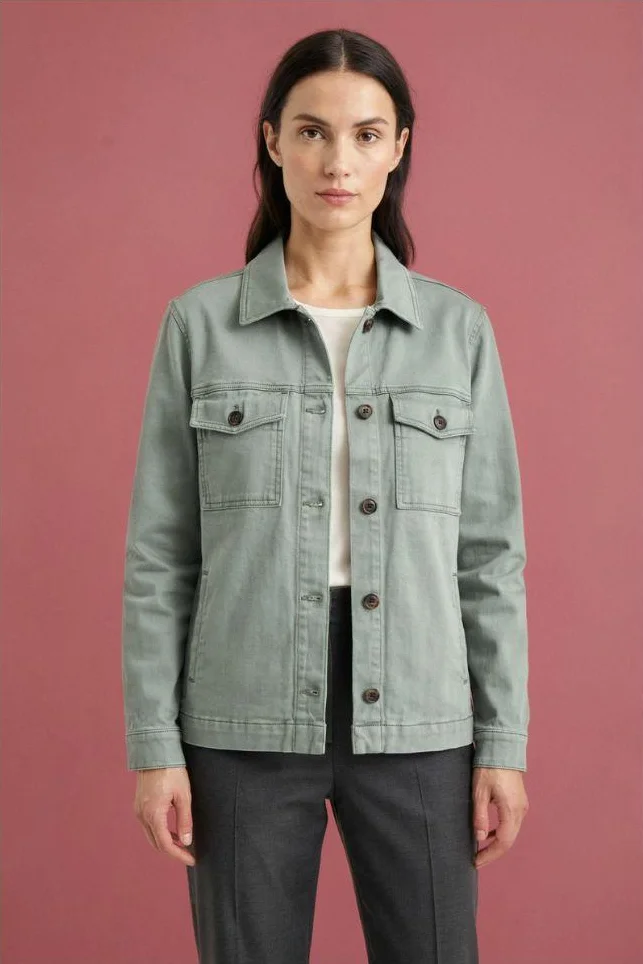
Edit brief: Change the background to muted dusty rose while retaining the model, clothing, pose, and framing.
Result: The background changed to dusty rose. The sage jacket, ivory top, and charcoal trousers remained recognizable, with a similar composition. The collar, pocket flaps, and front button row remained visible for comparison.
Inner-top edit: Revise one styling choice
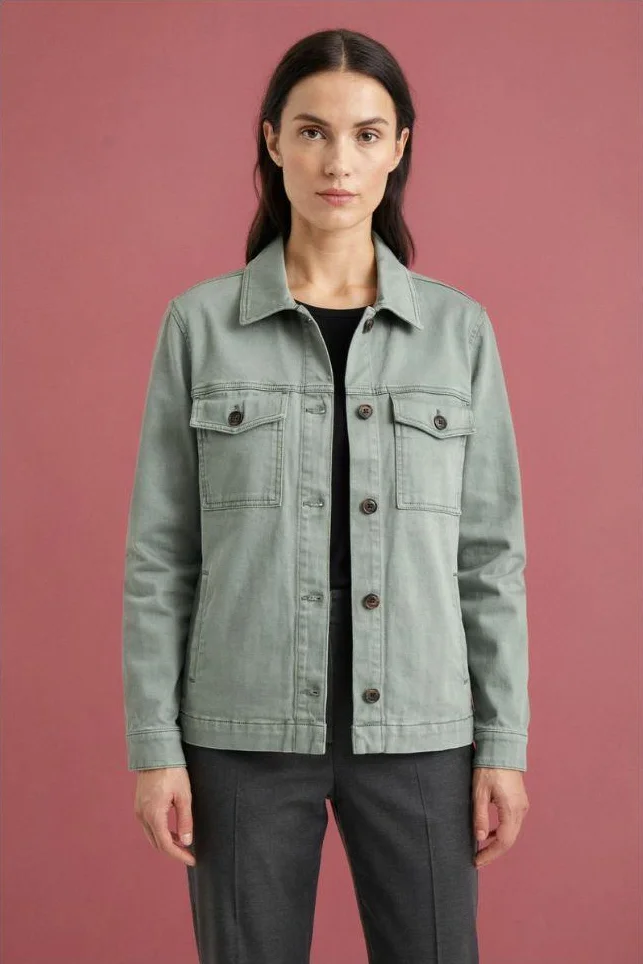
Edit brief: Using the dusty rose result, change the ivory inner top to black.
Result: The visible top became black while the sage jacket and dusty rose setting remained. We made this edit from the dusty rose result. We checked the jacket opening, where fabric, skin, and the inner top meet.
Original
Background edit
Inner-top edit
Our product-photo editing guide explains how to compare details through successive revisions.
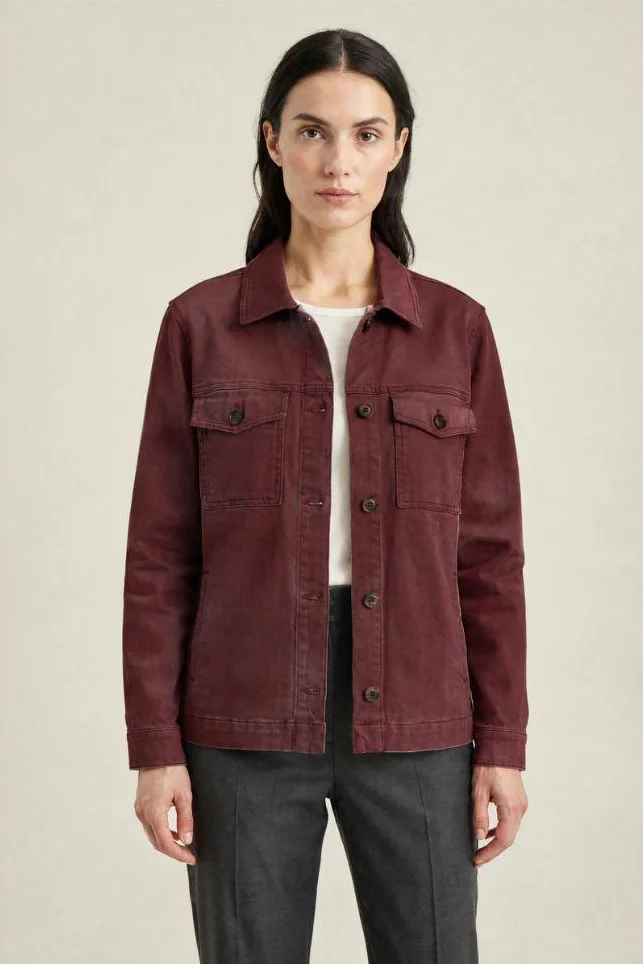
Colorways: Explore a burgundy jacket
Selection: We returned to the original image, selected the jacket, and requested burgundy.
Result: Colorways produced a burgundy jacket with a similar silhouette, pointed collar, chest pockets, and button-front design. The ivory top and light background remained.
For a collection review, save the requested color with the selected image. Our guide to changing product colors in photos covers selection boundaries and export checks.
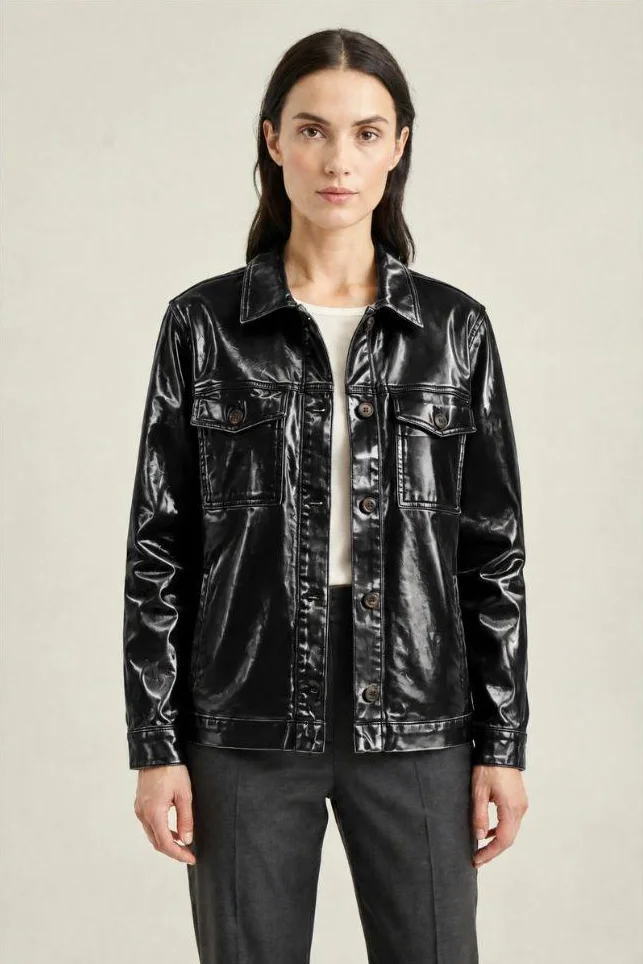
Material Swap: Explore a glossy black finish
Selection: From the original sage image, we selected the jacket and chose the second swatch in Leather & suede.
Result: The jacket acquired a glossy black, leather-like appearance, with strong highlights across its collar, sleeves, and body. Its chest pockets and button-front design remained recognizable; folds and reflections changed with the finish.
This gives designers a visual direction to discuss before sampling. The physical sample remains the reference for weight, stretch, and drape.
Original
Colorways
Material Swap
The tools : What are the best AI image generators for fashion photography?
Tool 1 : Ideogram: Best for reference-guided fashion imagery, poses and product variations
Ideogram is best for fashion teams that need generation, pose variations, campaign editing, colorways, and material studies in one platform. It combines fashion-specific tools with image generation, a layered editor, and enterprise custom models.
Create around your garment and casting references: Ideogram 4.5 accepts up to five reference images in the Image app. Your brief can identify which source provides the garment, person, or setting. For a new editorial direction, describe the outfit, lighting, and composition; for merchandise, supply actual product photographs and the details the result must show.
Recurring model references guide casting across scenes. The Model Pose Variants API addresses pose and camera changes in an existing fashion image, and is designed to retain the model, garment, and setting.
Develop garment images and collection options: Our Ghost Mannequin API turns photographs of one garment into isolated ghost-mannequin imagery. It supports directional product views and serves a different job from creating an image of a person wearing the item.
Colorways and Material Swap address color and surface exploration on selected regions. Our jacket examples show a burgundy colorway and a glossy black finish, each developed from the original sage image.
Revise and finish the campaign: Precise Edit targets local changes. Its context window keeps the surrounding image outside that window unchanged, supporting detailed work inside a high-resolution source.
Studio brings together layers, reference-guided edits, background changes, extension, and reframing. Editable text layers give you control over campaign copy and typography; Ad Resizer creates versions for different ad sizes. Face Swap, vector creation, and video generation extend the campaign options. Our product-to-campaign guide connects those stages.
Build around the brand: Custom Branded Models can be trained around your visual identity and product references. The Skechers case study describes division-specific models and Material Swap referencing its Product & Material Library. For apparel teams, discuss which garment categories, model references, and approved materials your custom model needs to support.
Our pricing lists Plus at $20/month or $180 annually; Pro at $60/month or $504 annually; and Team at $30/user/month or $240/user annually. App and model choices determine credit use.
Enterprise custom models and production are scoped with our team. Spreadsheet Batch and API editing have different model support, covered below.
Tool 2 : FASHN: Garment-to-model imagery and virtual try-on
If your starting asset is a garment photo and the missing deliverable is an on-model image, FASHN belongs on the shortlist.
Choose the right starting route: Its Try-On feature takes a person image and a clothing image, retaining the selected person and pose while applying the garment. Product to Model addresses another need: creating an on-model image from a product photograph, with reference controls for the resulting image.
For an engineering-led team: FASHN publishes an API with endpoints for try-on, product-to-model generation, and related fashion tasks.
Pricing: The app starts at $19/month with 200 monthly credits. API access has separate prepaid pricing from $0.075 per credit, with a $7.50 minimum purchase. Image-generation costs vary by endpoint, resolution, and mode; supported face-reference options add credits.
Test a fine print, sheer sleeve or layered outfit before choosing a credit allowance. Reference options and corrections can change how many credits each approved image needs.
Tool 3 : Botika: Apparel imagery with retouching support
Botika focuses on clothing brands and retailers working from existing product photographs.
The input changes your control: For an existing on-model photo, Botika says the pose and body type remain while the person and background change. Flat-lay and mannequin inputs let you select a model, pose, and background.
Its FAQ distinguishes between input types: existing on-model photos support bulk processing, while flat-lay and mannequin looks are created individually.
Plan for corrections: Annual plans include a photo-fix service, with turnaround depending on the plan.
Pricing and enterprise scope: Botika sells credit subscriptions and custom enterprise plans. Its FAQ lists one credit per photo and five per video. Included retouching depends on the subscription and billing terms. Its general FAQ and enterprise pricing describe custom models differently, so confirm the contracted scope if exclusive casting or backgrounds are part of your brief.
For a catalog built from flat lays, confirm the production process and turnaround. Botika’s on-model bulk feature does not cover those inputs.
Tool 4 : Photoroom: On-model imagery within a broader catalog operation
Photoroom fits teams that need clothing imagery alongside background removal, product editing, and other catalog assets.
Supply more than one product view: The Virtual Model API accepts clothing imagery, predefined or custom model references, scene choices and pose controls. It also accepts additional product images showing other angles or details.
Separate generation from enterprise QA: Photoroom’s enterprise Visual Agents offering describes quality criteria, fidelity scoring, retries and human escalation. This is a different purchase from running individual generations in an app.
Pricing and resolution: The app lists Pro at $7.50/month, Max at $20.99/month, and Ultra at $82.50/month, all billed yearly. These plans have different AI-credit and export allowances. In the published app comparison, 2K AI Fashion Models requires Max or Ultra, while 4K requires Ultra. API pricing and enterprise production are separate buying routes.
For a catalog requiring 4K fashion images, budget for Ultra or a separate API or enterprise arrangement.
Tool 5 : Claid: Fashion production across self-service, API and custom engagements
Claid serves teams producing both fashion and broader product imagery.
Pick the delivery model: Its fashion offering includes on-model generation from garment photos, model references, and API access. It also describes custom production engagements that bring engineering and creative support into recurring catalog work.
Commercial setup: Claid uses operation-based credits, with separate web and API plans and custom Business arrangements. Its Business offer includes custom SLAs, setup, support, and onboarding. Confirm which charges apply to generation, editing, upscaling and any managed production in your quote.
One fashion output may involve several billable steps. Test a typical supplier photo so your estimate includes preparation and finishing.
Tool 6 : Flair: Art-directed fashion and accessory campaigns
Flair suits creative teams that want to arrange a scene before generating the image.
Build the composition: Its drag-and-drop canvas lets you stage products and props. Reusable templates support repeated scene directions, while its fashion features cover clothing and jewelry on generated models.
Work together on the scene: Flair documents real-time collaboration and custom AI human-model features.
Pricing and licensing: Flair offers a free plan, paid plans with generation allowances, and custom Enterprise pricing. Its pricing page lists a Company Commercial License on Pro+ and higher paid tiers. Enterprise terms include custom credit amounts and API access; confirm consumption charges as well as access.
For accessory campaigns, inspect clasps, stones, and other small details separately from the scene. Also check that your plan’s commercial license covers your team’s use.
Tool 7 : Adobe Firefly + Photoshop: Campaign development and detailed finishing
Adobe fits teams whose final image passes through a designer or retoucher in Photoshop.
Keep finishing in the brief: Firefly supports image generation and visual exploration, while Photoshop provides selections, layers, compositing and retouching. That combination suits teams that expect to refine the generated image before delivery.
Name the approval product: If formal sign-off is required, Adobe’s GenStudio for Performance Marketing documents reviewer and approver roles. Its approval documentation states that all designated approvers must approve before content can progress.
Pricing: U.S. individual Firefly Standard starts at $9.99/month, with Pro at $19.99/month. Team and enterprise arrangements differ. Price the complete stack you require, including the relevant Photoshop edition, automation services, and approval products.
These capabilities span several Adobe products. A Firefly subscription alone does not include GenStudio approvals.
Tool 8 : Midjourney: Editorial concepts and campaign direction
Midjourney fits briefs centered on atmosphere, styling, and visual exploration.
Develop the look: Style References guide qualities such as colors, textures, lighting, and aesthetic. Subject references provide another input when exploring a recurring person or object within that direction.
Review literal details: Midjourney’s Omni Reference documentation notes that intricate details, including clothing logos, may not match perfectly.
Plans and privacy: Monthly plans cost $10 for Basic, $30 for Standard, $60 for Pro, and $120 for Mega. Annual payment carries a 20% discount. Stealth Mode is available on Pro and Mega, and companies above $1 million in annual gross revenue must use Pro or Mega under the published plan terms.
For unreleased collections, budget for Pro or Mega if you need Stealth Mode. For SKU imagery, inspect logos and other reference details before using the result.
Reference : How do I keep garment details accurate in AI fashion photos?
Compare every generated result with the approved garment references, checking construction, print scale, logos, color, and each visible view before publication.
A swimwear-brand owner in a discussion about precise fashion-photo edits described a delayed stock arrival and a need for preorder images. Their two sticking points were shortening an inseam from seven inches to five and applying a small pattern without blurring or enlarging it. Those are product-specific requirements that a general realism score would miss.
For a fine print or a measured construction change, define the acceptance criteria before generating. A five-inch inseam and a plausible-looking shorter leg are different deliverables.
Review the garment, the model, and the image direction separately. A mismatch in color, construction, or apparent fit can leave customers with expectations the delivered item cannot meet, creating a risk of complaints and returns.
- Construction: Check the collar, neckline, pockets, seams, closures, and hem.
- Surface detail: Inspect print size and placement, logos, embroidery, and texture.
- Color and material: Compare the approved shade, highlights, transparency and finish.
- Model consistency: Review the face, hair, proportions and styling across the set.
- Image direction: Match the lighting, crop, background and camera angle to the brief.
- Delivery: Confirm dimensions, crop safety, and export format.
Set rejection rules before generating. If a logo changes, the image fails. If the crop is slightly wide, an editor may be able to fix it. Those are different kinds of rework.
For another camera angle, provide another product view when possible. A system cannot observe the back construction of a jacket from a front-only photograph. It has to infer missing information, even if the result looks plausible.
For material exploration, review the image as a design proposal. A glossy surface may communicate a direction, but it cannot confirm how a physical sample will drape, stretch, or reflect light. Keep the selected visual tied to its swatch and revision so your sample request reflects the option your team approved.
Reference : How do I keep product photos consistent across a clothing collection?
Reuse an approved model reference, lighting direction, background, and crop, then review every new garment against the same visual brief.
In a community discussion about consistent product lighting, a seller reported irregular AI results when the images needed even lighting and the same color temperature. Individually attractive images can still look unrelated beside each other.
Choose one approved frame as the visual reference. Record the camera direction, crop, light and background, and separate those decisions from the garment reference for each SKU. Include a full-length garment, a patterned item, and a close-up in the trial so you see whether the direction survives different subjects.
Include the body types and sizes your brand represents. Check casting identity and garment proportions separately: shoulder placement, sleeve length, waistband position, and hem should be reviewed against the relevant product and size references. Don’t treat a generated appearance as evidence of size-specific fit. Compare the set as a contact sheet before approval.
Reference : What does batch support mean for a fashion catalog?
Batch support can mean a spreadsheet of prompts, multiple existing photographs, a set of garment-to-model requests, or a managed service. Confirm the specific operation you need to repeat.
For example, our Batch Generation documentation supports up to 500 prompt rows, with one to four images per row. That spreadsheet feature supports compatible models through Ideogram 4.0, not 4.5, partner models, or video. API jobs and custom production engagements are separate routes.
Before committing to volume, write down your unit of work: one SKU, its source views, the required outputs, and the checks each image must pass.
Keep the original asset ID with every generated result. Record the model, settings, revision, and approval status so a rejected output does not get mistaken for the final image during export. For implementation details, our enterprise image API guide covers asynchronous jobs, signed callbacks, and recovery after failed requests.
Reference : Does AI fashion photography save time once I include retouching?
AI saves production time only when generation, corrections, and review together take less time than your current route to an approved image.
A community discussion about using AI for product photos poses that exact buying question: does it save time once cleanup is included? Treat it as a question to measure with your own assets, not a benefit to assume from generation speed.
Record generation time, failed attempts, corrections, and reviewer time for each required deliverable. An accepted image is the unit that matters, not a completed generation.
Measure cost per approved asset: Add generation charges, retries, retouching, and reviewer time, then divide by the number of images approved for use.
For example, if a test costs $120 in generation and staff time and produces 30 approved images, the cost is $4 per approved image. This is an illustrative calculation, not a measured result from our test.
Reference : What should enterprise apparel teams verify before buying?
The commercial agreement needs to match the assets, models, and production route your team will use. A self-service subscription and an enterprise engagement may have different commitments.
| Buying question | What to confirm |
|---|---|
| Indemnification | Eligible services, outputs, exclusions and claim handling |
| Training data | Foundation-model disclosures and treatment of your uploads |
| Access | SSO, roles, provisioning, removal and SCIM if required |
| Custom models | Data requirements, access, ownership, updates and deletion |
| API delivery | Capacity, concurrency, SLA, support and failed-job handling |
| Approvals | Review roles, versions, sign-off and publication controls |
| Privacy | Retention, logs, subprocessors and partner-model handling |
Our enterprise offering includes Custom Branded Models, production engagements, Microsoft and Google SSO, configurable retention, and a DPA. Enterprise inputs are not used to train our shared models. Custom training on your data is opt-in.
Ideogram Enterprise also includes legal indemnification. Your enterprise agreement defines the applicable coverage and exclusions.
For every vendor, distinguish image history and collaboration from mandatory approval. A shared collection lets colleagues see the image. An approval gate determines whether an unapproved image can move forward.
Include an exit requirement too: identify which originals, approved outputs, and metadata you can export, and what happens to your custom model and stored data when the agreement ends.
If your bottleneck comes after image creation, such as regional versions and approvals, use our creative automation comparison to evaluate that part of the stack. Buying another generator won’t resolve an approval queue on its own.
Reference : Which platform should you put on your shortlist?
Start with the request already sitting in your team’s queue: a missing on-model shot, a new jacket color, or a campaign image that needs revising.
For campaign creation, controlled revisions, and color or material exploration, you can start creating in Ideogram with one image and one specific change. Keep the original beside the result and have the person who approves the garment review it.
If you need garment-to-model production, give your finalists the same source photos and acceptance criteria. Track the corrections as closely as the generation cost. That’s where you’ll see whether the tool fits your team’s deadlines and review capacity.
For a collection-wide rollout, bring your garment references, required outputs, and monthly volume to our enterprise team. We can discuss custom models and production built around your brand’s systems. Request an Ideogram Enterprise demo to review that scope with us.
Reference : Frequently asked questions
Can AI reproduce the exact clothing item I sell?
Start with photographs of the actual item to give the AI a clear garment reference. Ideogram can use these references to guide generation and editing. Before publishing, compare the result with the real garment, especially logos, prints, seams, color, and closures.
What photos should I prepare for AI fashion photography?
Prepare clear product views that show the details required in the output. Include front, back, and close-ups where relevant, plus the model image or material reference required by your chosen tool. Keep lighting and color references consistent so reviewers have a dependable baseline.
Can I keep the same model across a collection?
Yes. Reference images, saved model identities, and custom models can guide recurring casting. Our character-reference tools support working from a recurring identity. Test it across the poses, crops, and garments you need, then review the face and proportions separately from clothing accuracy.
Can we use AI models or swap faces in fashion imagery?
Use source photography and real-person references only with the permissions needed for the intended use. For casting changes, confirm that agreements cover the photograph, likeness, AI modification, and campaign distribution. A face swap does not itself clear those permissions. Our usage policy addresses consent for uploaded images and misleading use; commercial-use permission should not be treated as a substitute for likeness consent.